

Take a break without losing your credits
Need to step away from ColorBliss for a while? Pausing your subscription stops billing temporarily while keeping your rollover credits frozen and safe. When you're ready to come back, everything picks up right where you left off.
What pausing does
When you pause your subscription:
Billing stops immediately and won't resume until you unpause or the pause period ends
Rollover credits freeze and stay in your account, waiting for you to return
Purchased credits stay accessible so you can still use any credit packs you've bought
Your account stays active with full access to your dashboard, folders, and past work
Auto-resume kicks in after your chosen pause period ends
How to pause your subscription
Go to your profile page from the dashboard menu
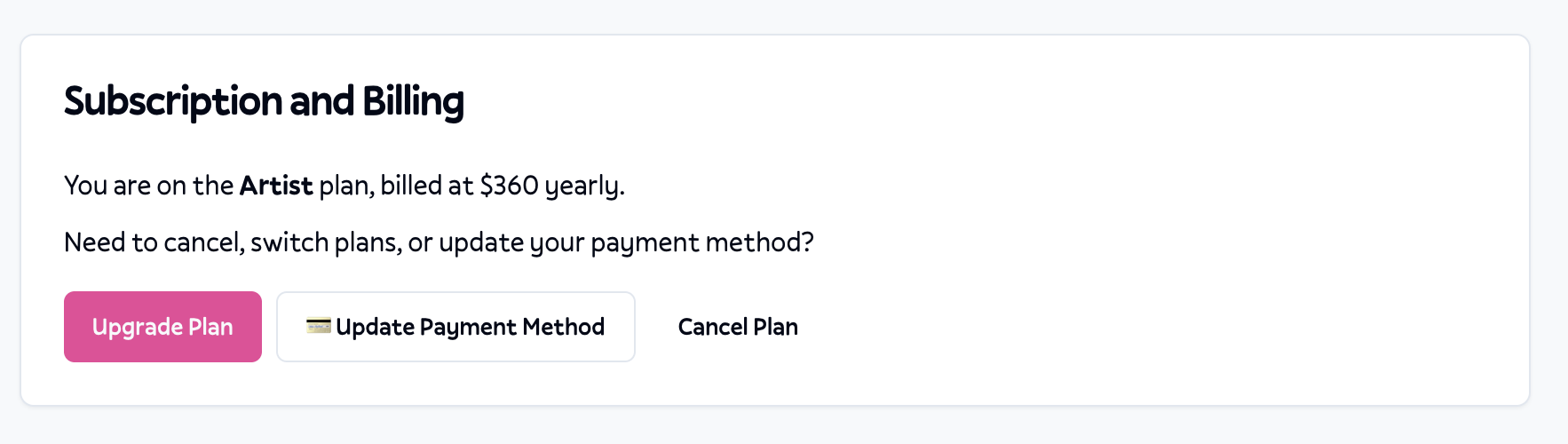
Find the subscription section showing your current plan
Click Cancel Plan to see your options
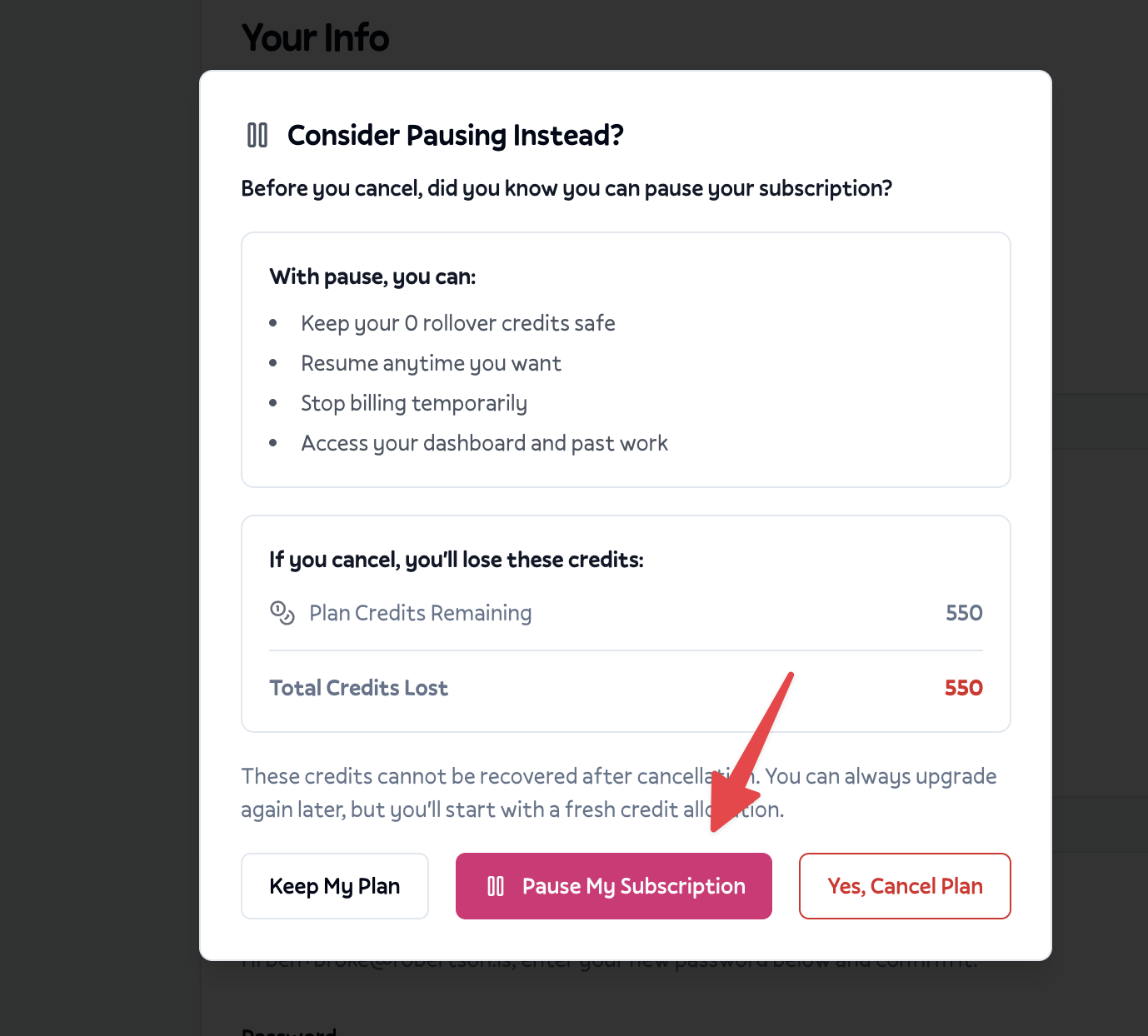
Choose Pause My Subscription instead of canceling
Select how long you want to pause (1 to 4 months)
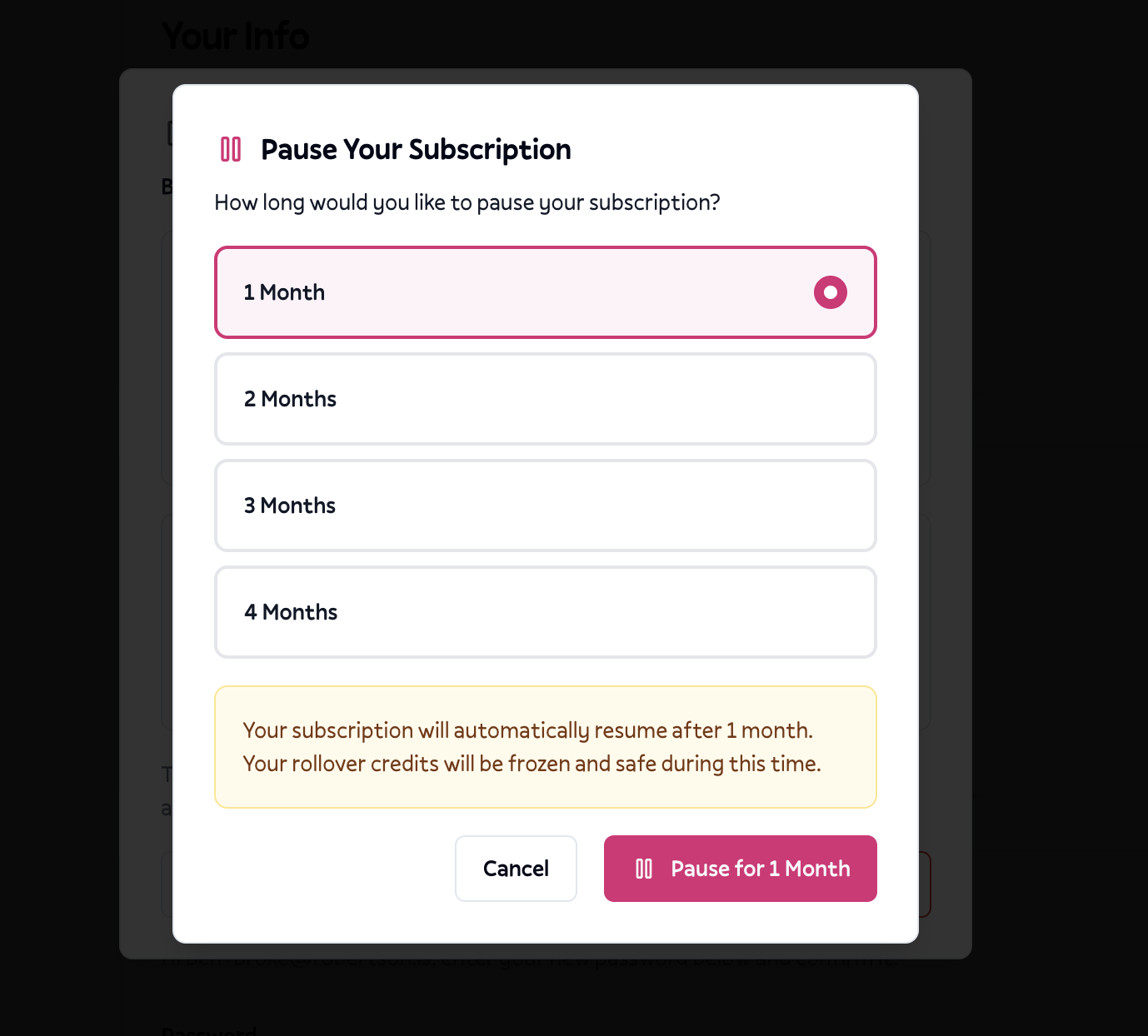
Confirm your choice to activate the pause
How to resume early
Changed your mind? You can come back anytime before your pause period ends.
Go to your profile page from the dashboard
Look for the paused subscription notice in yellow
Click Resume Subscription to reactivate immediately
Billing restarts right away and your frozen credits become available again
Where pausing works
Pausing is available for monthly subscribers only. If you're on an annual plan, you'll need to contact support for billing adjustments.
You can pause from:
Profile page in your dashboard settings
Cancel flow when you click to cancel (pause is offered as an alternative)
What happens to your credits
Understanding the difference between credit types during a pause:
Rollover credits are frozen. These are unused credits from previous billing cycles that rolled over. You can't use them while paused, but they're completely safe and will be available when you resume.
Purchased credits from credit packs remain usable. If you've bought extra credits separately, you can still spend them on coloring pages while paused.
Current plan credits stop at the pause. You won't receive new monthly credits until you resume.
When to pause vs when to cancel
Pause if you:
Plan to come back within a few months
Have rollover credits you want to keep
Need a temporary break (vacation, busy season, budget)
Want to try other tools but might return
Aren't sure yet and want time to decide
Cancel if you:
Know you won't use ColorBliss again
Don't have rollover credits to protect
Want a clean break with no auto-resume
Both options stop billing immediately. The main difference is what happens to your credits and whether your subscription automatically comes back.
What pausing doesn't do
Pausing doesn't extend your credits indefinitely. When you resume, your billing cycle restarts and credits work normally again.
Pausing doesn't protect credits from cancellation. If you cancel while paused (instead of resuming), you'll still lose your frozen rollover credits.
Pausing doesn't work for yearly plans. Annual subscribers should contact support for billing help.
Pausing doesn't limit future pauses. You can pause again after resuming if you need another break.
Tips
Pause before your next billing date to avoid being charged for a month you won't use. Check your billing date on your profile page.
Use up purchased credits first if you have any, since those stay accessible during the pause anyway.
Set a calendar reminder for when your pause ends if you want to decide whether to continue or cancel before auto-resume kicks in.
Consider a shorter pause if you're unsure. You can always extend by contacting support, but you can also resume early anytime.
Getting help
If you're having trouble pausing or resuming your subscription, email help@colorbliss.com with:
Your account email address
What you're trying to do (pause or resume)
Any error messages you're seeing
Your preferred pause duration if pausing
Next steps
Ready to take a break? Head to your profile page and look for the subscription section. If you're thinking about canceling, consider pausing first to keep your credits safe while you decide.
When you're ready to come back, your frozen credits and all your saved work will be waiting for you.